My first model in the Amazon SageMaker AI Workshop scored 89.257% accuracy. On the same data, a model that always answers "no" scores 88.73%. The most useful thing I took from the workshop was not an API. It was that a model's number means nothing until the evidence behind it can travel with the model to production.
The SageMaker AI Workshop, formerly the Immersion Day, is a level 300 walk through the ML lifecycle: 5 classical ML labs, 4 generative AI labs and 2 governance labs. I ran all of them in an instructor-led session. This isn't a tutorial, since AWS's labs already do that well. It's what I'd tell an engineer before they start, including one experiment I ran afterwards on the same dataset.
I took it because I wanted to explore enterprise MLOps.
What does the workshop cover?
Eleven labs, from a no-code model to audit paperwork. The notebooks for Labs 2 to 9 are in the public repo.
| Lab | Topic | What stayed with me |
|---|---|---|
| 1 | No-code model in Canvas | How easily you can get a convincing number |
| 2 | Training and deploying with code | SageMaker's simple packaging rules |
| 3 | Explaining decisions and checking bias | Shipping data cleaning with the model |
| 4 | Monitoring | Matching real outcomes back to predictions |
| 5 | MLflow and Pipelines | Train, test and register as one flow |
| 6–8 | Fine-tuning, ready-made models, AWS's AI chips | The training examples do the teaching |
| 9 | Running LLMs in production | A pass-or-fail release check for an LLM |
| 10–11 | Governance | Where the proof falls apart |
Why was 89% accuracy not a good result?
Because the dataset is imbalanced, so accuracy mostly measures how often people say no. Lab 1 predicts whether a bank customer subscribes to a term deposit after a marketing call, using the UCI bank-marketing data. I built the flow in SageMaker Canvas and ran a Standard build. The guide's example run shows roughly 91% accuracy and notes that results vary; mine was the one result across the labs that didn't match what the guide showed.
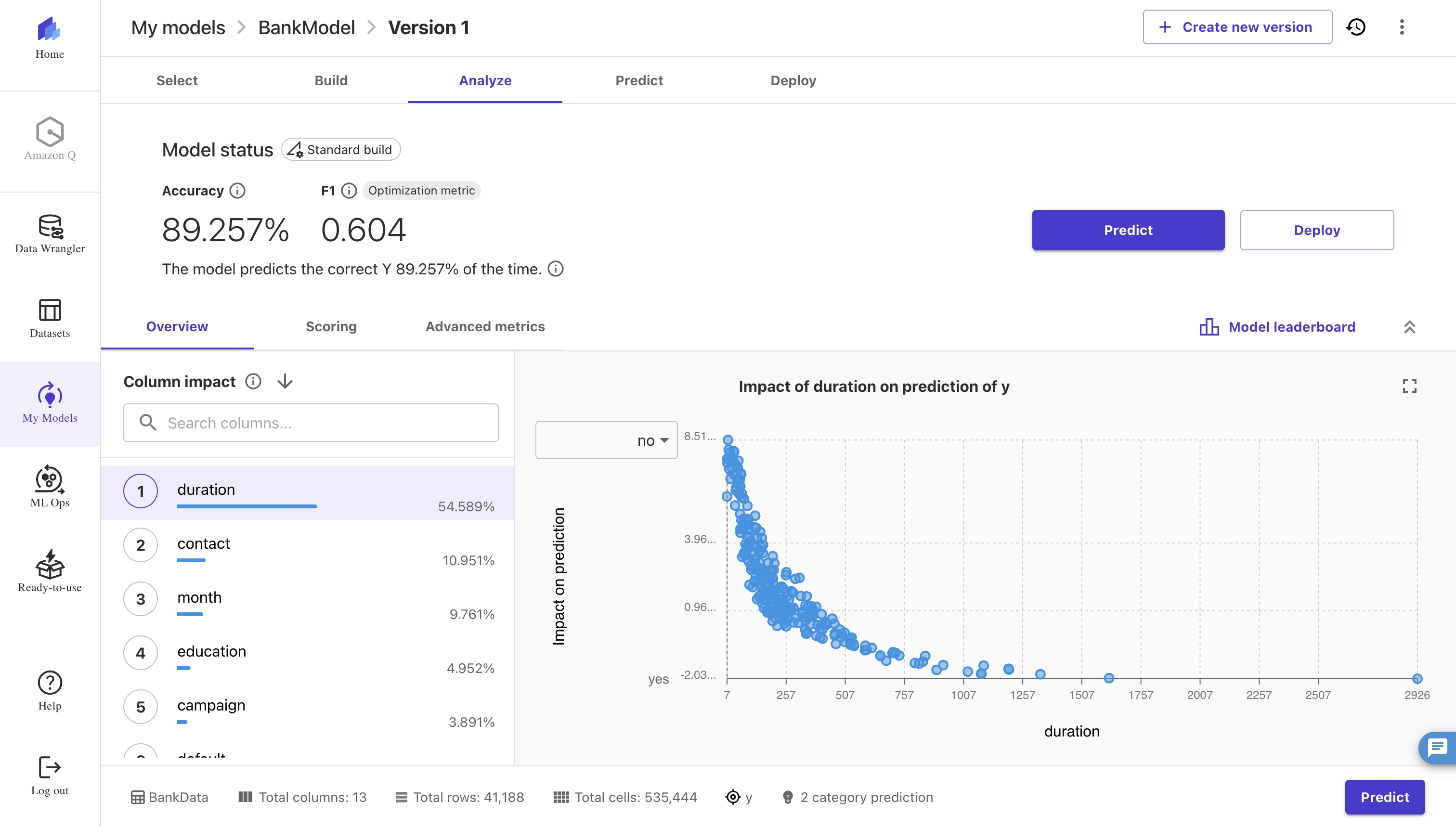
The lab guide describes the target as roughly 50/50. The CSV I downloaded is not: 36,548 no and 4,640 yes, or 88.73% against 11.27%. That changes how you read everything on the screen. F1 of 0.604 is the honest number here, and it's the one AutoML was optimising.
So my first rule from the workshop has nothing to do with SageMaker: compute the do-nothing baseline before you read any model metric. It takes one line of pandas.
Which feature was doing the work?
duration, the length of the last phone call, carried 54.589% of the column impact. The problem is that you only know how long a call lasted after it ended, and by then you usually know the outcome. The dataset's own documentation says this input should only be used for benchmarking and discarded for a realistic predictive model.
The workshop does flag it as suspicious. It also shows something quieter. The no-code path keeps duration, while the pro-code path in Lab 2 drops it, even though the two are presented as the same preparation. Two teams following the same guide would ship two very different models.
This mistake is called target leakage, and it looks the same everywhere:
| You want to predict | The giveaway input | Why it cheats |
|---|---|---|
| Will this customer cancel? | A "please stay" offer was sent | Offers go out after someone says they're leaving |
| Will this borrower miss payments? | Number of debt-collection calls | Collectors only call once payments are late |
| Will this IT issue become a major outage? | An emergency team was assembled | The team exists because it's already major |
| Will this support ticket escalate? | Assigned to a senior specialist | It reached them because it escalated |
Leakage doesn't even need a column. In a study of pneumonia detection on chest X-rays, AI models learned to recognise which hospital an image came from. One hospital had far more pneumonia patients (34.2%) than the others (about 1%), so knowing the hospital was already a strong clue, and the models did worse at outside hospitals in 3 of 5 comparisons.
What happens if you remove it and test on the future?
The model mostly stops working. I reran the data locally with a plain gradient-boosted model at default settings, so this measures the inputs and the split, not how far tuning could take it. UCI says the file is ordered by date from May 2008 to November 2010, so holding out the last 20% of rows is a real test on later customers.
| Inputs | How I split | ROC-AUC | F1 | Accuracy | Always "no" |
|---|---|---|---|---|---|
Canvas columns, with duration |
Shuffled | 0.920 | 0.509 | 90.5% | 88.7% |
Canvas columns, no duration |
Shuffled | 0.756 | 0.172 | 88.9% | 88.7% |
Canvas columns, no duration |
Last 20% by time | 0.529 | 0.152 | 69.0% | 69.2% |
Pro-code columns, no duration |
Shuffled | 0.776 | 0.313 | 89.8% | 88.7% |
Pro-code columns, no duration |
Last 20% by time | 0.647 | 0.150 | 69.6% | 69.2% |
Removing one column took ROC-AUC from 0.92 to 0.76. Testing on later customers took it to 0.53, which is close to a coin flip.
The reason is in the data. The share of yes answers climbs from 3.4% in the first quarter of the file to 45.9% in the last tenth. A shuffled split quietly hides that. The Canvas flow also dropped the macroeconomic columns that might have helped explain the shift, and the pro-code column set holds up better partly because it keeps some campaign history. Your split is a claim about the future, so it should look like the future.
The right test depends on how the model will be used:
| The model will face | Test it on | What goes wrong otherwise |
|---|---|---|
| Later time periods | The most recent months | It gets credit for patterns it couldn't have known |
| New customers | Customers it never saw in training | It recognises people instead of learning behaviour |
| New branches or hospitals | Whole branches it never saw | It learns the place, not the problem |
| More of the same, stable process | A random sample is fine | Very little, and this is rarer than it feels |
What does the pro-code path actually teach you?
That SageMaker is a contract about paths and ports. A Processing job reads from /opt/ml/processing/input and writes to /opt/ml/processing/output. A training container writes to /opt/ml/model. A serving container answers /ping and /invocations on port 8080. Respect that, and the workload can be Python, Go or anything else that fits in a container.
The modern SDK makes this cleaner. ModelTrainer and ModelBuilder replace the old Estimator and Predictor pattern, and the preprocessing script in the lab imports nothing from SageMaker, so you can unit-test it on a laptop. Two small things will cost you time if nobody warns you: hyperparameters must be strings, and a trailing slash on an S3 prefix changes whether SageMaker treats it as a folder.
The pattern I'd copy into real work is from Lab 3: a serial inference pipeline. A fitted preprocessor and the model run as two containers behind one endpoint, so callers send raw input. Preprocessing can't drift away from what the model trained on, because it ships inside the deployment.
Why did AWS rebuild the bias lab?
Because SageMaker Clarify closed to new customers on July 30, 2026, along with Model Monitor and several other SageMaker features. Existing customers can keep using them. The workshop now uses open-source SHAP for explanations, plain pandas for the bias formulas, Evidently for drift, and managed MLflow to store it all.
I think that's the better lesson. Class imbalance, difference in positive proportions and disparate impact are published formulas computed from counts. They were never the proprietary part. If your governance depends on one managed feature, your governance has a roadmap you don't control.
How do you know a model is still good in production?
You compare its predictions with what actually happened, and you plan for that on day one.
Lab 4 is the most production-shaped lab in the workshop. It captures real requests to S3, tags each one with an InferenceId so labels arriving later can be joined back, checks drift and F1 in a scheduled pipeline, and alerts through SNS. Its CriticalFeatures parameter lets one important feature alert even when overall drift looks calm. It also injects artificial drift, including stretching duration by 15%, so remember to remove that if you borrow the code.
Also note that the alert for falling model quality stays off until you set a minimum score. That default shows a distinction worth keeping: drift is smoke, and real outcomes are the verdict.
- Data can drift harmlessly. Holiday shopping looks unusual, and the model may be fine.
- Quality can collapse while the data looks normal. Fraudsters change tactics while their purchases still look ordinary.
Example: A customer may only spot a fraudulent charge on their statement weeks later. So today's dashboard can't tell you how well the fraud model did this week. And if you didn't save what the model saw and decided at the time, you can't check it later either.
Before you launch, write down when the real outcomes arrive, how you'll match them to predictions, and what you'll watch until then.
Where does the evidence get lost?
Between the tools. Lab 5 shows how much can be answered automatically: a commit triggers a build, a pipeline trains and evaluates, a conditional step registers the model only if it passes, a person approves it, and staging and production follow from CloudFormation. Then I reached Lab 10.
| A reviewer asks | Where the answer lives | How it gets to the review |
|---|---|---|
| Which commit and data? | Lineage graph | Automatically |
| Which metrics? | Model Registry, from evaluate.py |
Automatically, if the JSON shape is right |
| Who approved it? | Registry and pipeline | Automatically |
| Is it biased? Why does it decide this way? | MLflow artifacts | Retyped by hand into a model card |
| Is it still good today? | Evidently reports in MLflow | Nothing links it back |
The Lab 3 reports use MLflow's format, which a model card can't attach, so the lab tells you to copy the numbers in manually. That's a reasonable workaround for a workshop. In a bank it's a real weakness, because the bias numbers are exactly the ones an auditor will trace, and a human copying numbers between two systems is where that trace breaks.
What changes when the model is an LLM?
Less than I expected. In Lab 6, SFTTrainer fine-tunes Qwen 3 8B without a cluster to size, and the data shape does most of the teaching: wrap the reasoning in <think> tags and the model learns to produce them. I've written about LLM fine-tuning before; here the work moved from the training loop to the dataset and the recipe.
Lab 9's pipeline is Lab 5 again with different artifacts: preprocess, fine-tune, evaluate, conditionally register. ROUGE replaces accuracy, an LLM judge adds a qualitative score, and tracing becomes the observability layer. The gate is the same idea. On serving, inference components let several models share one endpoint, and LEAST_OUTSTANDING_REQUESTS suits LLMs because request lengths vary so much. If that part interests you, I went deeper in production inference on EKS.
One thing to watch: every real-time endpoint bills until you delete it. The lab guide puts ml.g5.2xlarge at about $1.50 an hour, so one forgotten over a weekend is around $70.
What would I do differently on my next ML project?
Four things, and none of them require SageMaker:
- Baseline first. Report every metric next to the score of a model that does nothing.
- Ask of every feature: do I know this at prediction time? Then let a tool check it too, because the Canvas path carries
durationstraight through. - Split the way time flows whenever the data has a date.
- Make evidence a build artifact. If a person has to copy a number from one system to another, that number will eventually be wrong.
The workshop gave me a solid map of the whole lifecycle, and I'd recommend it to anyone working with ML on AWS. It also leaves one gap open: the checks exist, the registry exists, and the model card exists, yet nothing makes a model unable to reach production without its evidence attached. That's the piece I want to build next.
Credit: the labs and their datasets belong to AWS and their original authors. The UCI Bank Marketing dataset is by Moro, Rita and Cortez, licensed CC BY 4.0.