Notes from the AWS Connected Community Workshop — GenAI on EKS (Level 400 + Level 600 Strands Agents). Stack: vLLM · Ray Serve · Karpenter · Grafana · AMP · OpenWebUI · Mistral · AWS Strands Agents.
The workshop is organized as a progression — cluster foundation, inference engine, observability, distributed serving, and finally agentic AI. This post follows the same arc and documents the design decisions behind each layer rather than just the configs.
Workshop Structure
This post follows the same progression — from cluster foundation to agentic AI — documenting what each layer does and why the design decisions were made the way they were.
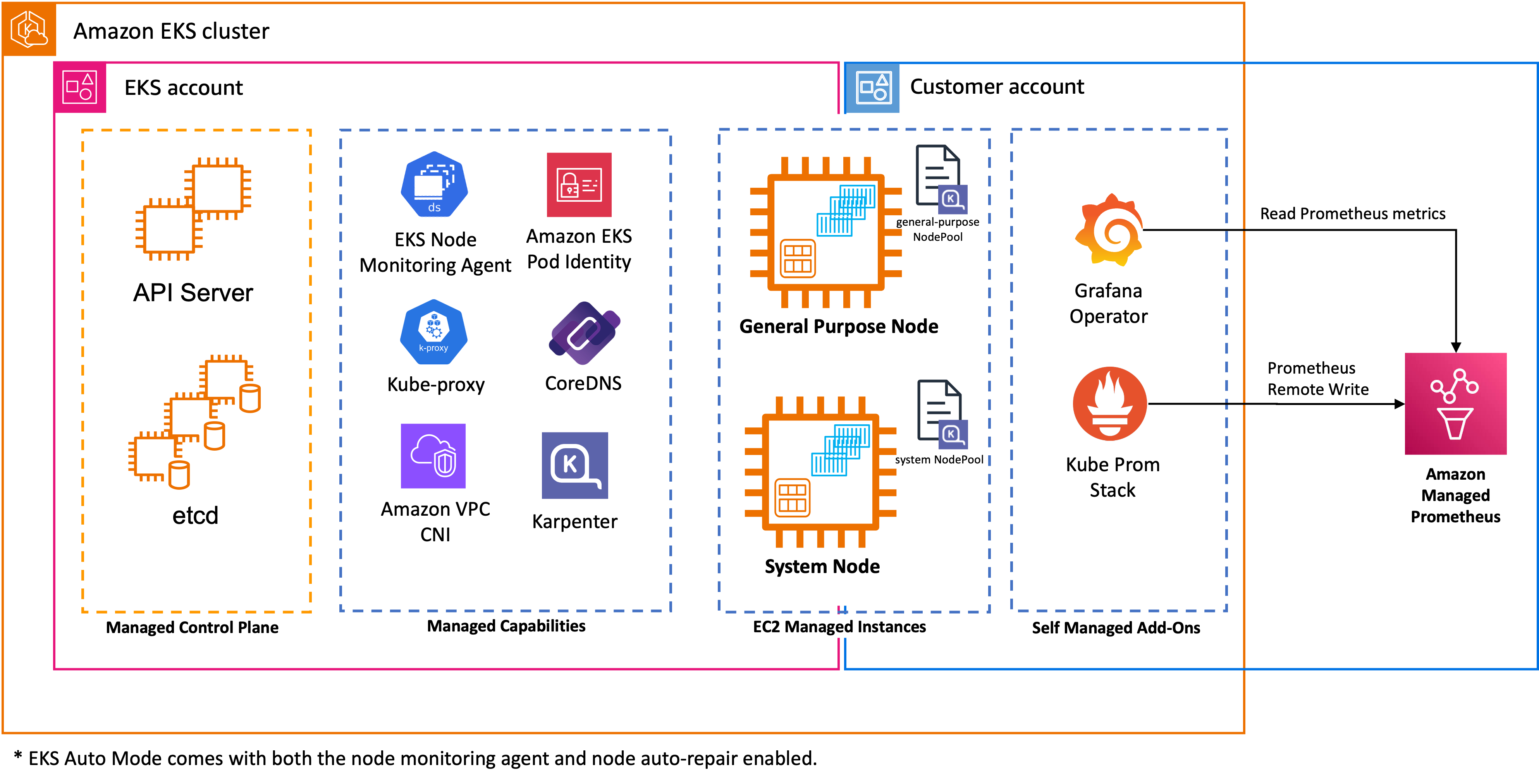
Part 1: The Foundation — EKS Auto Mode and GPU Infrastructure
EKS Auto Mode
EKS Auto Mode is the cluster management model used throughout the workshop. Rather than manually managing node groups, AMIs, and add-on lifecycles, Auto Mode delegates that entirely to AWS. It:
- Automatically provisions right-sized EC2 instances based on pending pod requirements
- Selects EKS-optimized AMIs without manual versioning
- Manages core add-ons (CoreDNS, kube-proxy, VPC CNI)
- Handles security patching and node lifecycle
For AI/ML teams, the key benefit is focus: you configure workload requirements, and the cluster figures out the infrastructure.
Three NodePools — Separation of Concerns
The workshop pre-provisions three distinct NodePools, each with a specific role:
System NodePool runs cluster infrastructure with a CriticalAddonsOnly taint — nothing application-level can schedule here. General Purpose NodePool handles CPU workloads (OpenWebUI, Prometheus, Grafana). GPU NodePool is fenced with nvidia.com/gpu:NoSchedule — only inference pods land there.
This separation means a poorly behaved application pod can never accidentally consume a $2/hour GPU instance.
Bottlerocket OS — Embedded NVIDIA Support
The workshop uses Bottlerocket as the node OS for all three NodePools. For GPU nodes specifically, Auto Mode automatically selects Bottlerocket AMI variants that have NVIDIA drivers and the device plugin embedded — no DaemonSet installation, no manual driver management.
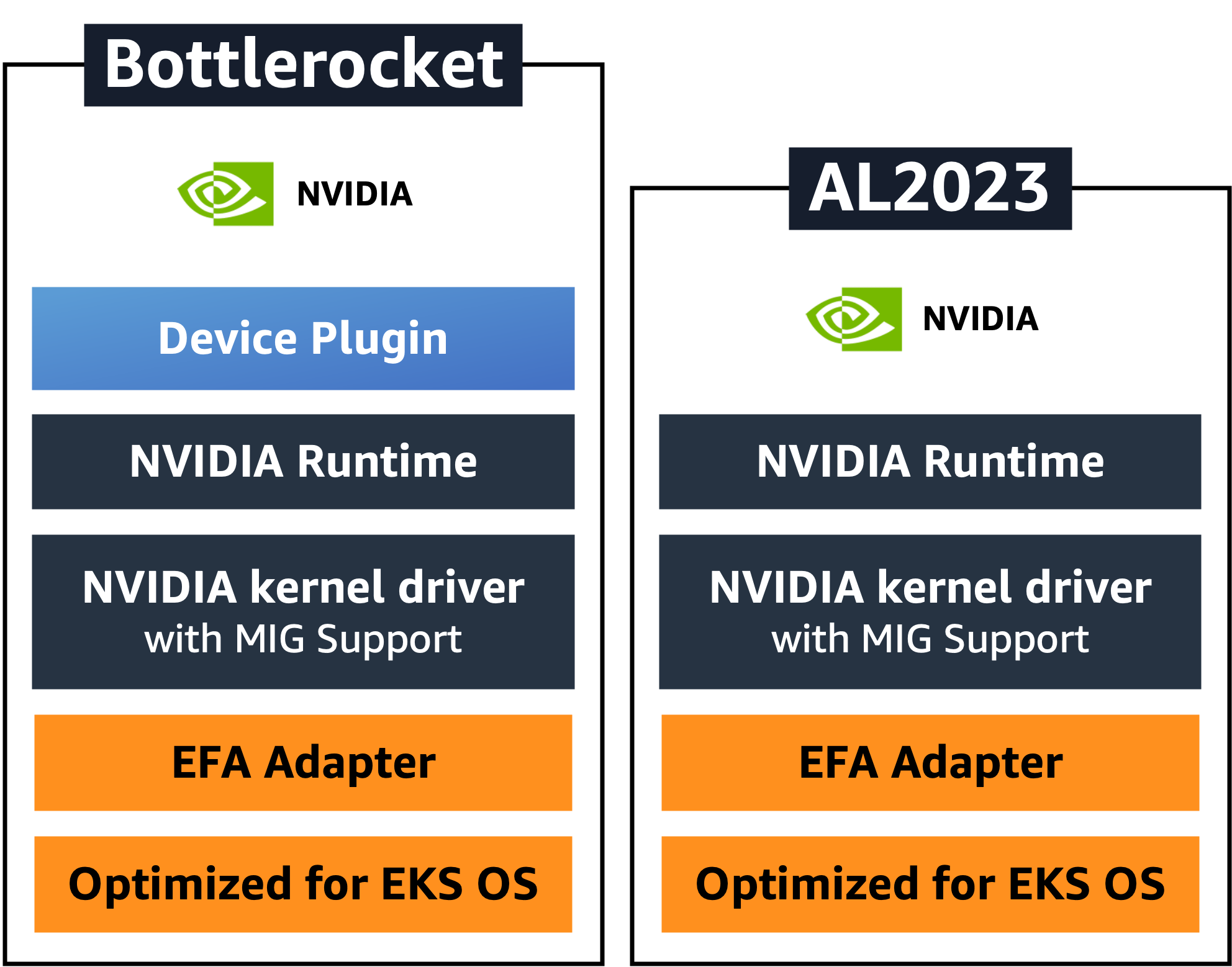
The comparison matters: on AL2023, you typically deploy the NVIDIA Device Plugin as a DaemonSet separately. With Bottlerocket on Auto Mode, the device plugin is already present on the node when it joins the cluster. GPU workloads can schedule immediately after node registration, without waiting for a DaemonSet to start.
Both OS variants include MIG (Multi-Instance GPU) support in the kernel driver and EFA (Elastic Fabric Adapter) for high-bandwidth inter-node networking — relevant when you scale to multi-node tensor parallelism.
SOCI Snapshotter — Eliminating Cold Start Latency
Large ML container images (often 5–20GB) traditionally require a full download before any container can start. On GPU instances, this is the dominant source of cold-start latency.
EKS Auto Mode automatically enables SOCI (Seekable OCI) Snapshotter for G, P, and Trn instance families. As of November 2025, this is always-on with no configuration required.
How SOCI works: rather than downloading the entire image layer before extracting it, SOCI allows containers to start while the image is still being pulled, fetching only the file system regions actually needed for startup. On NVMe-backed GPU instances (which g6e provides), SOCI's parallel pull and unpack leverages the high IOPS storage for dramatically faster startup.
The practical impact: what used to be a 10–15 minute container startup on a GPU node becomes minutes. Combined with the RunAI Streamer for model loading (covered in the vLLM section), cold-start latency for a new inference replica is now a solvable problem rather than an accepted cost.
Part 2: vLLM — The Inference Engine
Why vLLM
vLLM is not the only inference engine — TensorRT-LLM is a valid alternative for NVIDIA-optimized deployments. The workshop uses vLLM because of its breadth of production capabilities:
- Up to 24× higher throughput than standard PyTorch inference
- Paged Attention — manages KV cache as virtual memory pages, reducing GPU memory usage by up to 60% and enabling larger batch sizes
- Continuous batching — processes tokens from multiple concurrent requests in a single forward pass
- OpenAI-compatible API surface — direct drop-in for any OpenAI SDK client
- Native function calling / tool-use support
Two Deployment Patterns
The workshop covers two ways to deploy vLLM, progressing from simple to distributed:
Pattern A — Standalone Deployment (S3 model source)
# vllm-s3-deployment.yml
args:
  - '--model=s3://genai-models-340818556942/Ministral-3-8B-Instruct-2512/'
  - '--load-format=runai_streamer'
  - '--model-loader-extra-config={"concurrency":16}'
  - '--gpu_memory_utilization=0.90'
  - '--max-model-len=2048'
  - '--enable-auto-tool-choice'
  - '--tool-call-parser=mistral'
env:
  - name: VLLM_ATTENTION_BACKEND
    value: "FLASHINFER"
The model lives in S3 (genai-models-<account-id> bucket, provisioned by Terraform) and is loaded via RunAI Streamer with 16 parallel S3 threads. A 16GB bfloat16 model goes from ~15 minutes sequential download to ~2 minutes parallel streaming. This is critical for autoscaling — replica cold starts must be fast enough to be useful.
FLASHINFER as the attention backend outperforms FlashAttention-2 on decode-heavy workloads on the A10G/L40S GPU family (g6e instances). It's a drop-in swap controlled by an environment variable.
Key flag interactions:
| Flag | Value | What it controls |
|---|---|---|
gpu_memory_utilization |
0.90 | 90% VRAM for KV cache; 10% headroom for CUDA |
max-model-len |
2048 | Max tokens per request (prefill + decode) |
max-num-seqs |
256 | Maximum concurrent sequences in the engine |
enable-auto-tool-choice |
— | Activates function-call parsing |
tool-call-parser |
mistral | Parses Mistral's native tool-call format into OpenAI JSON |
Pattern B — Ray + vLLM (covered in Part 4)
This pattern wraps the vLLM engine inside a Ray Serve deployment class, adding distributed autoscaling. Same inference semantics, different serving topology.
Automatic Function Calling in Action
With --enable-auto-tool-choice --tool-call-parser=mistral, vLLM intercepts Mistral's native tool-use output and converts it to OpenAI-compatible tool_calls blocks transparently. Your application code doesn't change:
response = client.chat.completions.create(
    model="mistral",
    messages=[{"role": "user", "content": "What's the latency to host 10.1.2.3?"}],
    tools=[{
        "type": "function",
        "function": {
            "name": "ping_host",
            "parameters": {"type": "object", "properties": {"host": {"type": "string"}}}
        }
    }]
)

# response.choices[0].message.tool_calls[0].function.name == "ping_host"
# Your code executes the function, returns result, re-submits
This is the exact mechanism Strands Agents relies on. The inference layer and the agent layer share a contract — the vLLM tool parser is the bridge.
Part 3: Observability — GPU Hardware + Inference Telemetry
The workshop's observability module teaches something important: you need two separate layers of metrics to understand what's happening in an LLM inference system.
/metricsArchitecture
vLLM /metrics endpoint      DCGM Exporter (port 9400)
         │                           │
         ▼                           ▼
  kube-prometheus-stack   ◄──────────┘
         │
         │  remote_write
         ▼
  Amazon Managed Prometheus (AMP)   ← serverless, no storage management
         │
         ▼
      Grafana  ← pre-built dashboards for vLLM, Ray Serve, DCGM
Amazon Managed Prometheus (AMP) replaces self-managed Prometheus storage. The kube-prometheus-stack handles in-cluster scraping and remote-writes to AMP. This is the right separation: scraping belongs inside the cluster (where it has pod network access); retention and querying belongs outside (where it's durable and scalable).
DCGM Exporter — Hardware Layer
# values.yaml (helm install dcgm-exporter)
serviceMonitor:
  enabled: true
  additionalLabels:
    release: kube-prometheus-stack     # Must match Prometheus Operator selector
  interval: 30s

nodeSelector:
  karpenter.sh/nodepool: gpu           # Only runs on GPU nodes

extraEnv:
  - name: "DCGM_EXPORTER_KUBERNETES"
    value: "true"                      # Labels metrics with pod/namespace context

tolerations:
  - key: "nvidia.com/gpu"
    operator: "Exists"
    effect: "NoSchedule"
The additionalLabels: release: kube-prometheus-stack is not optional — Prometheus Operator uses this label as a selector to discover ServiceMonitor objects. Get this wrong and metrics simply don't appear.
DCGM_EXPORTER_KUBERNETES: true enriches every hardware metric with pod and namespace labels. Without it, you know a GPU is at 80% utilization; with it, you know which pod is driving it.
DCGM exposes: GPU utilization %, VRAM usage, temperature, power draw, SM clock speed, PCIe throughput — the full hardware picture.
vLLM Inference Metrics
vLLM exposes a /metrics Prometheus endpoint with serving-layer telemetry. In the Ray deployment, this endpoint is explicitly mounted:
route = Mount("/metrics", make_asgi_app())
route.path_regex = re.compile('^/metrics(?P<path>.*)')
app.routes.append(route)
Metrics that matter in production:
| Metric | Meaning | Alert threshold |
|---|---|---|
vllm:gpu_cache_usage_perc |
KV cache fill % | > 0.85 → OOM risk |
vllm:num_requests_waiting |
Queue depth | > 30 → scale-out needed |
vllm:num_requests_running |
Active sequences in engine | — |
vllm:time_to_first_token_seconds |
TTFT latency | Varies by SLO |
vllm:time_per_output_token_seconds |
Decode throughput | — |
vllm:prompt_tokens_total |
Prefill token count | — |
vllm:generation_tokens_total |
Decode token count | — |
What I Observed Under Load
Running prompt load through OpenWebUI against a single g6e.2xlarge (NVIDIA L40S GPU), the Grafana dashboards showed:
- GPU utilization spiked to ~85% during prefill phases, settling to ~45% during streaming decode
- KV cache reached ~60% at 20 concurrent requests (
max_model_len=2048) - TTFT held under 800ms for prompts under 512 tokens
- Decode throughput plateaued around 180 tok/sec on a single replica
- Ray Serve autoscaling triggered at ~22 concurrent requests — second replica provisioned within ~90 seconds including Karpenter node warmup
The pre-built Grafana dashboards made this immediately visible. The value of the observability module wasn't just configuring the tools — it was building the mental model for what "healthy" inference looks like at the metric level.
Part 4: Ray + vLLM — Distributed Inference Serving
The advanced module introduces Ray Serve as a distributed actor framework wrapping the vLLM engine. The architecture from the workshop:
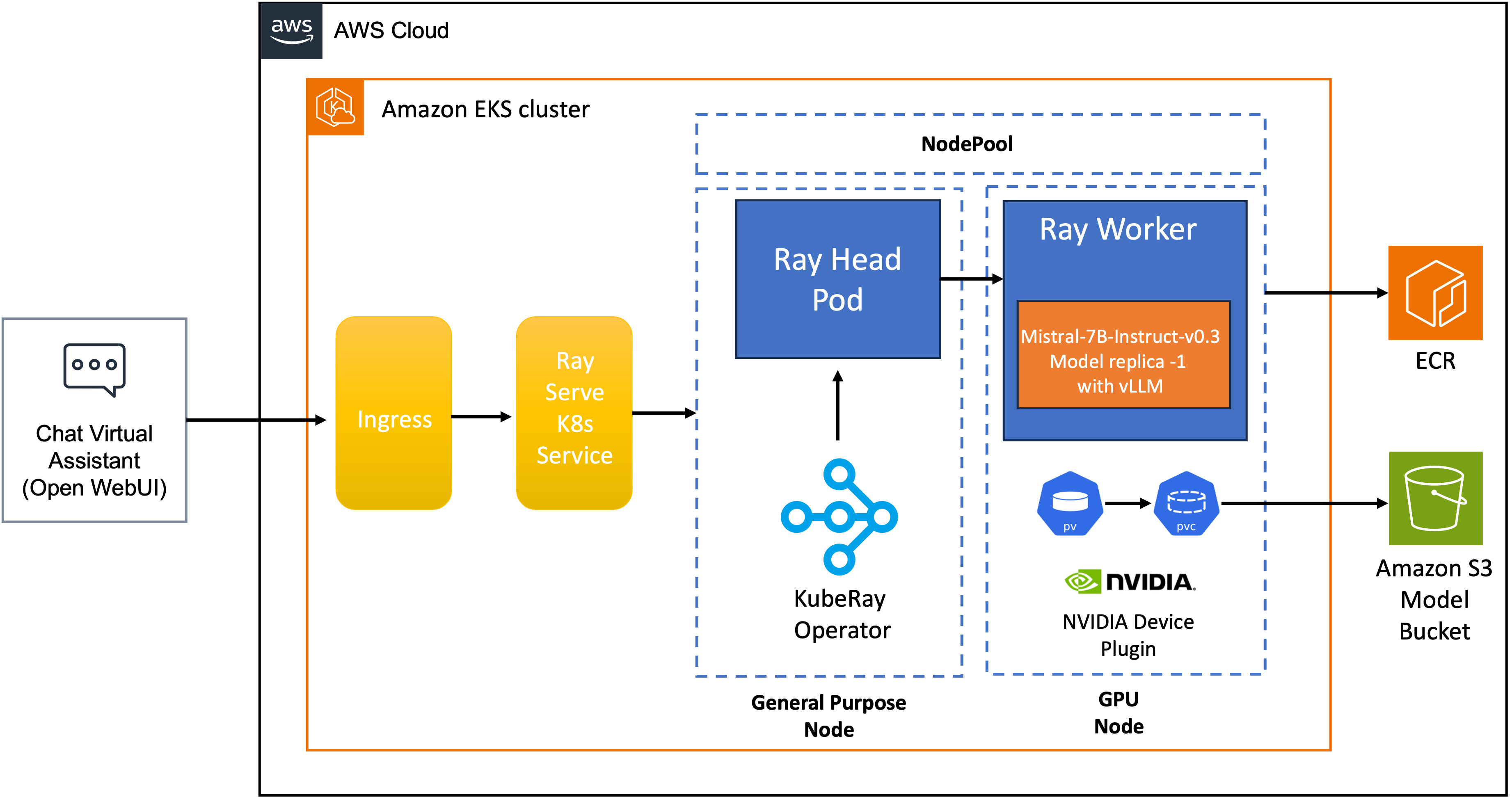
The key components are:
- Ray Head Pod — manages Ray cluster state (GCS), routes requests, runs the Ray dashboard (port 8265). Zero GPUs.
- Ray Worker — hosts the
VLLMDeploymentactor, owns one GPU, runs theAsyncLLMEngine - PV/PVC — model weights mounted from the Mountpoint S3 CSI Driver
- Ingress + K8s Service — external traffic path into Ray Serve
The Deployment Actor
@serve.deployment(
    name="mistral-deployment",
    ray_actor_options={"num_gpus": 1},
    health_check_period_s=10
)
@serve.ingress(app)
class VLLMDeployment:
    def __init__(self, model, tensor_parallel_size, max_num_seqs, max_model_len, ...):
        engine_args = AsyncEngineArgs(
            model=model,
            dtype="bfloat16",
            gpu_memory_utilization=0.9,
            enable_chunked_prefill=True,   # Prevents long prompts blocking the batch
        )
        self.engine = AsyncLLMEngine.from_engine_args(engine_args)
enable_chunked_prefill=True breaks long prompts into chunks during prefill. Without this, a single 2048-token prompt monopolizes the GPU for its entire prefill phase while all other requests wait. Chunked prefill interleaves prefill and decode work, improving perceived latency for concurrent users.
Autoscaling Configuration
autoscaling_config:
  metrics_interval_s: 0.2          # Sample queue every 200ms
  min_replicas: 1
  max_replicas: 4
  look_back_period_s: 2            # Short window — responsive to bursts
  upscale_delay_s: 30              # Scale up after 30s of sustained load
  downscale_delay_s: 600           # Hold GPU for 10 min before releasing
  target_num_ongoing_requests_per_replica: 20
max_concurrent_queries: 100
Ray Serve autoscales on in-flight request count, not CPU or GPU utilization metrics. This is the correct primitive: a GPU at 100% utilization serving one request is fine; 50 requests queued means your capacity model is wrong.
The asymmetric delays are deliberate. Upscaling at 30s protects latency under burst load. Downscaling at 600s avoids GPU node thrashing — Karpenter provisioning a new node takes 60-90s, so frequent scale-in/scale-out cycles would cost more in latency than they save in compute costs.
Head Node Isolation — A Hard Rule
# Head node configuration
ray start --head --num-gpus=0 --num-cpus=1
The head node runs with num-gpus=0 by design. If the head node crashes, the entire Ray cluster goes down. Colocating GPU work with the cluster's single point of failure is an operational mistake. The head runs on stable on-demand CPU compute (m5/c5 family); GPU work lives entirely in worker nodes that Karpenter can provision and deprovision independently.
Part 5: AWS Strands Agents on EKS — The Level 600 Module
What Strands Is
AWS Strands Agents SDK is an open-source Python framework built on a model-driven philosophy: rather than building explicit decision trees or state machines, you hand the LLM a system prompt and a set of tools. The model decides when and how to use them.
The framework's core components map directly to how modern LLMs work:
┌─────────────────────────────────────────────────────┐
│                  Strands Agent                        │
│                                                       │
│  Model  ←──── reasoning engine (any LLM)             │
│  Tools  ←──── functions the model can call           │
│  Prompt ←──── natural language task definition       │
│                                                       │
│  Agentic Loop:                                        │
│  User Query → LLM reasons → selects tool → executes  │
│            → observes result → LLM reasons again     │
│            → (repeat) → final answer                  │
└─────────────────────────────────────────────────────┘
The loop continues until the model determines it has enough context to produce a final answer. No developer-coded conditionals, no explicit graph edges.
The Workshop Agent — Time and Weather Tools
The workshop builds a concrete agent with two tools: a time lookup and a weather lookup based on location. Simple enough to understand fully, but complete enough to demonstrate the full agentic loop:
from strands import Agent, tool
from strands.models import BedrockModel
import httpx
from datetime import datetime
import pytz

@tool
def get_current_time(timezone: str) -> str:
    """Get the current time for a given timezone."""
    tz = pytz.timezone(timezone)
    return datetime.now(tz).strftime("%Y-%m-%d %H:%M:%S %Z")

@tool
def get_weather(location: str) -> str:
    """Get current weather for a location."""
    response = httpx.get(f"https://wttr.in/{location}?format=j1")
    data = response.json()
    current = data["current_condition"][0]
    return f"Temperature: {current['temp_C']}°C, {current['weatherDesc'][0]['value']}"

agent = Agent(
    model=BedrockModel(model_id="us.amazon.nova-pro-v1:0"),
    tools=[get_current_time, get_weather],
    system_prompt="""You are a helpful assistant that provides time and weather information.
    When users ask about time or weather in a location, use the available tools to get accurate data."""
)

# Agent decides which tools to call, in what order, how many times
response = agent("What's the weather like in Toronto right now, and what time is it there?")
What happens internally when you call agent(...):
1. User query → agent sends to LLM with tools array in the request
2. LLM reasons: "I need timezone and weather data for Toronto"
3. LLM returns tool_call: get_current_time("America/Toronto")
4. Strands executes tool → "2025-04-20 14:32:00 EDT"
5. Result fed back into conversation history
6. LLM reasons again: "I still need weather"
7. LLM returns tool_call: get_weather("Toronto")
8. Strands executes tool → "Temperature: 12°C, Partly cloudy"
9. LLM now has sufficient context → generates final answer
10. Agent returns: "It's currently 2:32 PM EDT in Toronto (12°C, partly cloudy)"
The developer wrote zero routing logic. The model handled all of it.
Deploying on EKS
The agent is containerized as a Flask application and deployed via Helm:
# app.py
from flask import Flask, request, jsonify
from strands import Agent

app = Flask(__name__)
agent = Agent(model=..., tools=[get_current_time, get_weather], system_prompt=...)

@app.route("/agent", methods=["POST"])
def run_agent():
    prompt = request.json.get("prompt")
    response = agent(prompt)
    return jsonify({"response": str(response)})
# Build → ECR → Helm
docker build -t strands-weather-agent .
docker push ${ACCOUNT}.dkr.ecr.${REGION}.amazonaws.com/strands-weather-agent:latest

helm install strands-agent ./chart \
  --set image.repository=${ACCOUNT}.dkr.ecr.${REGION}.amazonaws.com/strands-weather-agent \
  --set image.tag=latest \
  --set replicaCount=3
EKS Pod Identity (the successor to IRSA) handles IAM permissions for Bedrock access — the service account is associated with an IAM policy at the pod level, with no annotation-based trust policy complexity.
Connecting Strands to In-Cluster vLLM
Strands is model-agnostic: it speaks OpenAI-compatible API. The same vLLM endpoint serving OpenWebUI also serves your agents — no additional infrastructure, no egress:
# Point Strands at the local vLLM endpoint instead of Bedrock
from strands.models.openai import OpenAIModel

agent = Agent(
    model=OpenAIModel(
        base_url="http://vllm-serve-svc:8000/v1",
        model_id="mistral",
    ),
    tools=[get_current_time, get_weather],
    system_prompt=...
)
The tool-call contract is fulfilled by the vLLM flags you configured earlier: --enable-auto-tool-choice --tool-call-parser=mistral. Strands emits OpenAI tool-use format; vLLM parses Mistral's native format and converts transparently. The layers compose correctly.
Strands vs. LangGraph — When to Use Which
Having worked with LangGraph for multi-step RAG pipelines, the distinction is worth being explicit about:
| Dimension | LangGraph | Strands |
|---|---|---|
| Control model | Developer defines graph: nodes, edges, state transitions | LLM decides flow at runtime |
| Best for | Deterministic, auditable workflows | Open-ended reasoning tasks |
| Transparency | Full step-by-step traceability | OpenTelemetry traces, reasoning logs |
| Multi-agent | LangGraph multi-agent patterns | Agent Squad for orchestration |
| Tool definition | @tool decorator |
@tool decorator |
| Model lock-in | Model-agnostic | Model-agnostic (Bedrock, Anthropic, Ollama, LiteLLM) |
| MCP support | Via LangChain MCP adapter | Native MCP integration |
Use Strands when the task is exploratory and the LLM's reasoning capability is the right planner. Use LangGraph when you need predictable, replay-auditable execution — compliance workflows, financial pipelines, anything where "what exactly happened" matters more than "did it produce the right answer."
The Complete Request Path
Assembling all layers, a user query travels this path through the stack:
1.  User types in OpenWebUI (m5 General Purpose node)
2.  OpenWebUI POSTs to vllm-serve-svc:8000/v1/chat/completions
3.  Ray Serve K8s Service routes to VLLMDeployment actor (least-queued replica)
4.  AsyncLLMEngine schedules request with Paged Attention
5.  Bottlerocket GPU node — NVIDIA L40S executes prefill
6.  L40S executes decode — tokens stream back
7.  [If tool_call in response] → Strands agent executes tool → re-submits to vLLM
8.  Final token stream: vLLM → Ray Serve → OpenWebUI → browser
9.  vLLM metrics update: TTFT, generation tokens, cache usage %
10. DCGM metrics update: GPU util, VRAM, power draw, temp
11. kube-prometheus-stack scrapes both → remote_write to AMP
12. Grafana dashboards reflect state in near real-time
Key Takeaways
EKS Auto Mode + three NodePools is the right baseline for mixed AI/ML clusters. System, General Purpose, and GPU pools with taints/tolerations ensure workloads land where they belong and GPU capacity can't be accidentally consumed by application pods.
Bottlerocket with embedded NVIDIA support + SOCI snapshotter eliminates two historically painful operational steps. Driver management and image download latency were previously per-team responsibilities. Auto Mode handles both automatically.
vLLM is a request scheduler, not just a model server. Paged Attention, continuous batching, and chunked prefill are mechanisms that determine your throughput/latency profile. The observability layer makes these mechanics visible.
Ray Serve's request-count autoscaling is the correct primitive for inference. GPU utilization doesn't tell you when to scale; queue depth does.
Strands is a model-first paradigm shift. The developer defines tools and a system prompt. The LLM handles routing, sequencing, and reasoning. On EKS, agents are just containerized services — the infrastructure is identical to any other microservice, and the inference endpoint is shared.