When a coding agent works in your AWS account, CloudTrail records its calls as yours, and nobody can easily say what it did, whether any of it was risky, or what access it actually needed. Chaperone answers those three questions from records AWS already writes. It reads CloudTrail, groups every AWS API call under the MCP tool call that made it, flags risky calls with fixed rules, and measures the least-privilege policy from what the agent really used.
I built it in four days for the AWS Zero to Shipped hackathon, with Claude Code doing the building through the AWS MCP Server. So the first thing Chaperone ever recorded was its own construction. Every session on the live site is real.
Links: live Chaperone · 3-minute tour · code on GitHub
Why does a coding agent need a flight recorder?
Because access to AWS is being handed to agents faster than anyone reviews what they do with it. Most teams give the agent the developer's own credentials, so in CloudTrail the agent and the human are the same person.
In May, AWS made the AWS MCP Server generally available, which means any MCP-capable agent can call AWS APIs directly. That's a good thing. But it moves the hard question from "can the agent do this?" to "what did the agent do?"
That question isn't hypothetical. In July 2025, a malicious prompt shipped inside version 1.84.0 of the Amazon Q Developer extension for VS Code, telling the agent to delete cloud resources. AWS says it failed to run and no customers were affected. Every team that had it installed still had to ask: did our agent run any of it? The answer is sitting in CloudTrail. It's just not in a shape a person can read.
How do you tell the agent apart from the developer?
Give the agent its own identity. That one decision is what makes everything else in Chaperone possible.
On Day 0 I created an IAM Identity Center user called chaperone-agent with a permission set that expires every four hours. The agent runs on a Linux VPS with no browser, so it signs in with a device code that I approve from my laptop:
aws sso login --profile chaperone-agent --use-device-code --no-browser
aws sts get-caller-identity --profile chaperone-agent
# → arn:aws:sts::111122223333:assumed-role/AWSReservedSSO_ChaperoneAgent_.../chaperone-agent
Then Claude Code gets the managed AWS MCP Server through the SigV4 proxy, locked to that profile:
claude mcp add-json aws-mcp '{"type":"stdio","command":"uvx",
  "args":["mcp-proxy-for-aws-cli@latest","https://aws-mcp.us-east-1.api.aws/mcp",
          "--metadata","AWS_REGION=us-east-1"],
  "env":{"AWS_PROFILE":"chaperone-agent"}}'
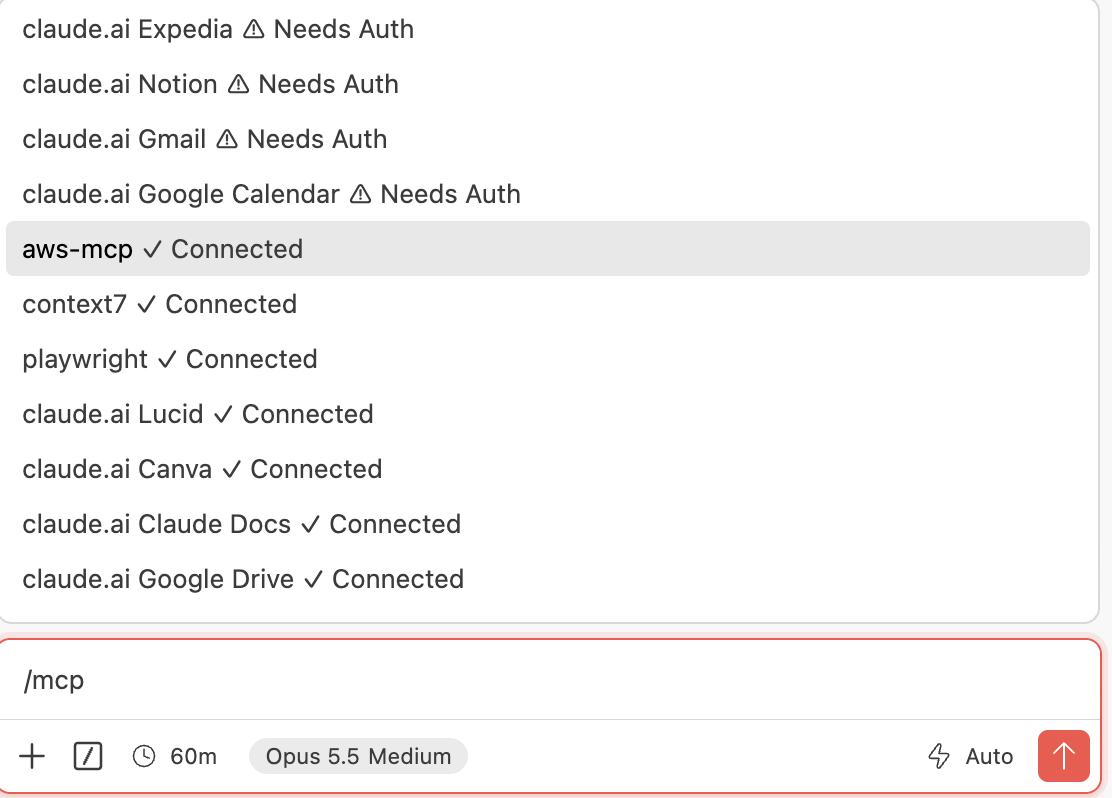
Two rules came out of this. The human and the agent never share an identity, and the agent never holds a long-lived key. The four-hour expiry turned out to matter more than I expected: every working day started with the agent's session dead and me approving it again. That's annoying, and it's also exactly the point.
The identity paid off on Day 1. The first live run filed 558 of the agent's calls as generic SDK traffic, because Terraform's user agent doesn't mention Claude Code. With its own identity, that didn't matter: anything done by chaperone-agent is the agent's, whatever tool made the call. The user agent only tells you the channel (MCP, Terraform, CLI).
The discovery: one tool call, three levels in CloudTrail
The whole product rests on something I found on Day 0, about an hour in. I asked the agent to query CloudTrail for its own events, and one agent action showed up at three levels.
- The MCP tool call. An event from
aws-mcp.amazonaws.com, namedCallReadWriteTool, whose user agent names Claude Code and its version. It lists every AWS API call the tool made, with request IDs. - Each AWS API call under it, marked
invokedBy: aws-mcp.amazonaws.com, with the matching request ID. - The agent's plain CLI calls, separately, with their own user agent.
Here's the shape of the first level, trimmed, simplified, and with identifiers replaced:
{
  "eventSource": "aws-mcp.amazonaws.com",
  "eventName": "CallReadWriteTool",
  "eventType": "AwsMcpEvent",
  "userAgent": "python-httpx/0.28.1 mcp-proxy-for-aws/1.7.0 claude-code/2.1.280",
  "requestParameters": {
    "method": "tools/call",
    "params": {
      "name": "aws___run_script",
      "arguments": "[HIDDEN_DUE_TO_SECURITY_REASONS]"
    }
  },
  "additionalEventData": {
    "downstreamRequests": [
      {
        "apiName": "s3:CreateBucket",
        "requestId": "EXAMPLE1",
        "awsRegion": "us-east-1"
      },
      {
        "apiName": "s3:PutObject",
        "requestId": "EXAMPLE2",
        "awsRegion": "us-east-1"
      },
      {
        "apiName": "cloudfront:CreateOriginAccessControl",
        "requestId": "EXAMPLE3",
        "awsRegion": "us-east-1"
      }
    ]
  }
}
Join that list to the API events on request ID and you get a tree: session → MCP tool call → AWS API call. CloudTrail holds every link. No AWS console shows the tree.
Three details in that event shaped the design:
- Every tool call is
readOnly: false, evenGetCallerIdentity. So Chaperone judges risk from the API calls underneath, never from the tool call. - AWS hides the script the agent sent. Arguments come back as
[HIDDEN_DUE_TO_SECURITY_REASONS]. Chaperone can show what the agent called, not the code it wrote. - MCP reveals calls the trail doesn't log.
s3:PutObjectis a data event, which a management-events trail never records. It appears only in the MCP event's downstream list. The agent's own record is more complete than the trail.
The first thing the agent built that night was a private S3 bucket behind CloudFront: two MCP run_script calls, 16 seconds of AWS API calls, live at chaperone.fullstackfusions.com before midnight. That hello-world became the first session Chaperone ever replayed.
Four minutes that changed the architecture
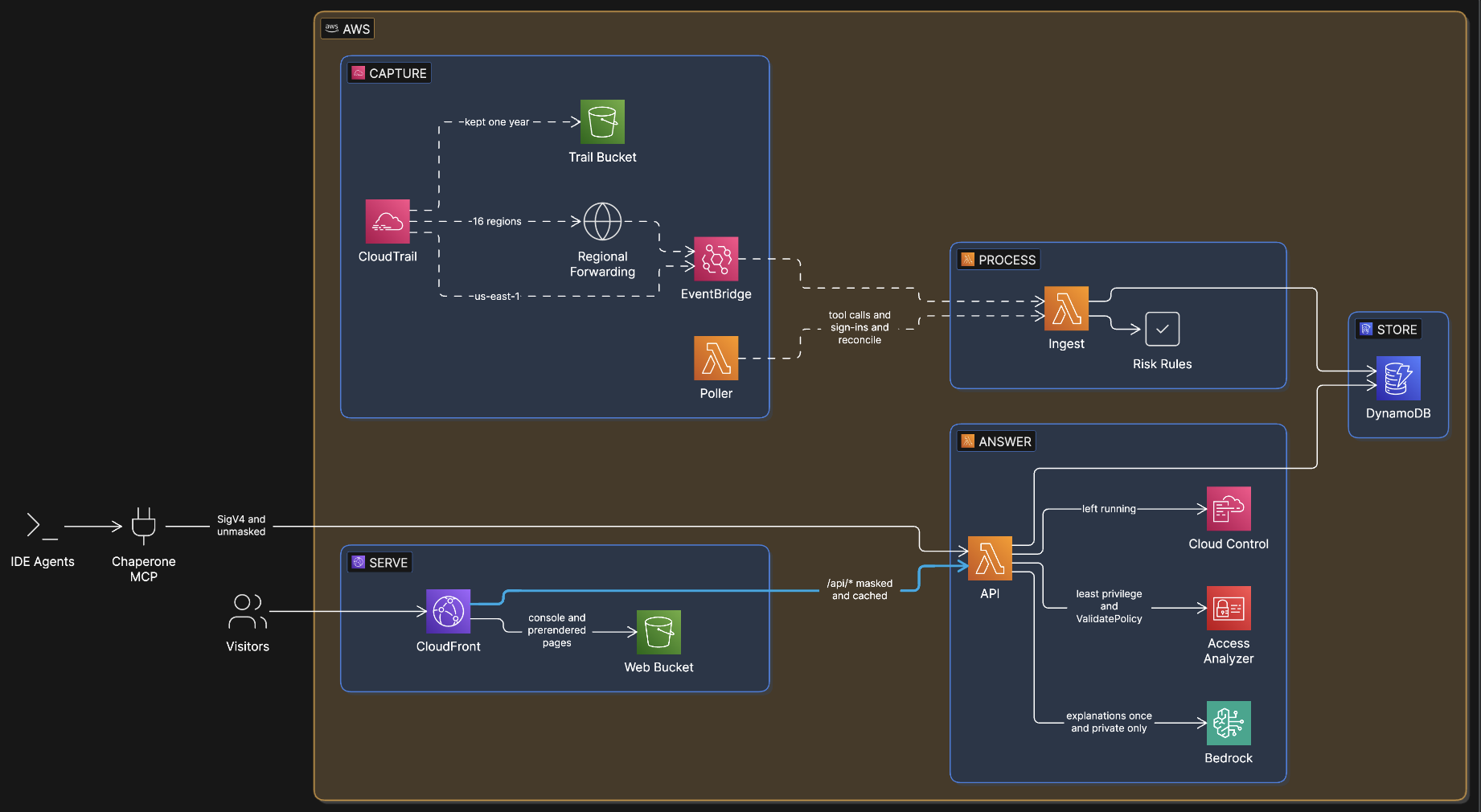
The plan was simple: an EventBridge rule catches CloudTrail events in near real time and a Lambda stores them. Before writing any of it, I gave the question a 30-minute timebox: does EventBridge deliver the MCP tool-call events at all?
The agent built a probe through MCP: an SQS queue and a rule matching every event from :chaperone-agent, read-only events included. Then one read and one write. Four minutes later the queue held six ordinary API events and zero MCP tool-call events, although LookupEvents showed both tool calls sitting in CloudTrail.
So ingest became a hybrid:
- EventBridge forwards API calls from every enabled region to us-east-1 within seconds. (Every region came later, on Day 1, after the agent changed the trail in us-east-2 and the audit-tampering rule never saw it. CloudTrail delivers to EventBridge only in the region where the call happened.)
- A poller runs every minute and fetches the MCP tool-call events with
LookupEvents, which is free.
The two paths arrive in any order, so I stopped trying to assign events to sessions at write time. DynamoDB stores events per actor (PK = ACTOR#<actor>, SK = <time>#<KIND>#<eventID>). Sessions (a 30-minute idle gap), the tool-call join and the risk roll-up are pure functions that run when someone reads. Writes are idempotent, so EventBridge, the poller and a backfill can overlap safely, and every rule is testable on recorded events.
The MCP side of the model is small. From the backend:
def _tool_fields(r: dict) -> dict:
    """An MCP event. Tool arguments and results are hidden by AWS; what's left is the tool
    name and the AWS APIs it called."""
    req = r.get("requestParameters") or {}
    params = req.get("params") if isinstance(req.get("params"), dict) else {}
    downstream, verdicts = [], []
    for d in (r.get("additionalEventData") or {}).get("downstreamRequests") or []:
        service, _, action = (d.get("apiName") or ":").partition(":")
        v = rules.classify(service, action)
        verdicts.append(v)
        downstream.append({"api": d.get("apiName"), "request_id": d.get("requestId"),
                           "region": d.get("awsRegion"), "risk": v.risk})
    top = rules.worst(verdicts)
    return {"tool": params.get("name") or r.get("eventName"),
            "downstream": downstream, "risk": top.risk, "reasons": top.reasons}
The query layer later re-judges each call with its full request parameters once the API events are joined in. A bucket policy is only "public exposure" if it really grants Principal: * without a condition, not because the API is called PutBucketPolicy.
What did the four days look like?
Each day had one job. The agent did the building inside AWS; I approved its sign-ins, made the decisions, handled DNS in Cloudflare, and pressed apply when the agent's guardrails said a human should.
| Day | What shipped | The moment worth remembering |
|---|---|---|
| 0 (Thu) | Account hardened, CloudTrail on, agent identity, AWS MCP Server, hello-world on CloudFront with a custom domain | The three-level discovery, and the EventBridge probe that came back without MCP events |
| 1 (Fri) | Terraform state in S3; Day 0 imported; ingest pipeline, risk rules, every region, review API, MCP server | terraform plan: 12 to import, 0 to add, 0 to change. Terraform described what the agent had built by hand, exactly |
| 2 (Sat) | Public view of the API, CloudFront /api/*, React console with the flight path |
Live at the domain a day before the "live or drop" checkpoint |
| 3 (Sun) | Bedrock explanations per session, the judges' tour, prerendered pages | The agent reviewing its own session on camera |
Two things from those days changed how I think about working with an agent.
The guardrail stopped the agent at the right place. On Day 1, Claude Code's auto mode refused a terraform apply -auto-approve. From then on it was always plan -out=x.tfplan, read the plan, apply the file. On Day 2 it refused even the reviewed apply, as a protected infrastructure change. So the agent wrote and reviewed the plan, and I ran the apply. For a product about supervising agents, that's the right shape.
Real events made the best test fixtures. I pulled all 90 of Day 0's agent events and sanitized them into a fixture file. Doing that turned up two surprises: CloudTrail had logged 40 full session tokens in AssumeRoleWithSAML responses, and the Identity Center SAML issuer URL carried the account ID base64-encoded, so a plain-text search for the account ID missed it. Every rule since then is tested against recorded calls, not invented ones. The suite ended Day 3 at 116 tests.
What did the recorder find in its own build?
Its first finding was about itself. On Day 1, Chaperone flagged its own build session for identity escalation: the agent had put inline policies on the Lambda roles it just created. That flag is correct.
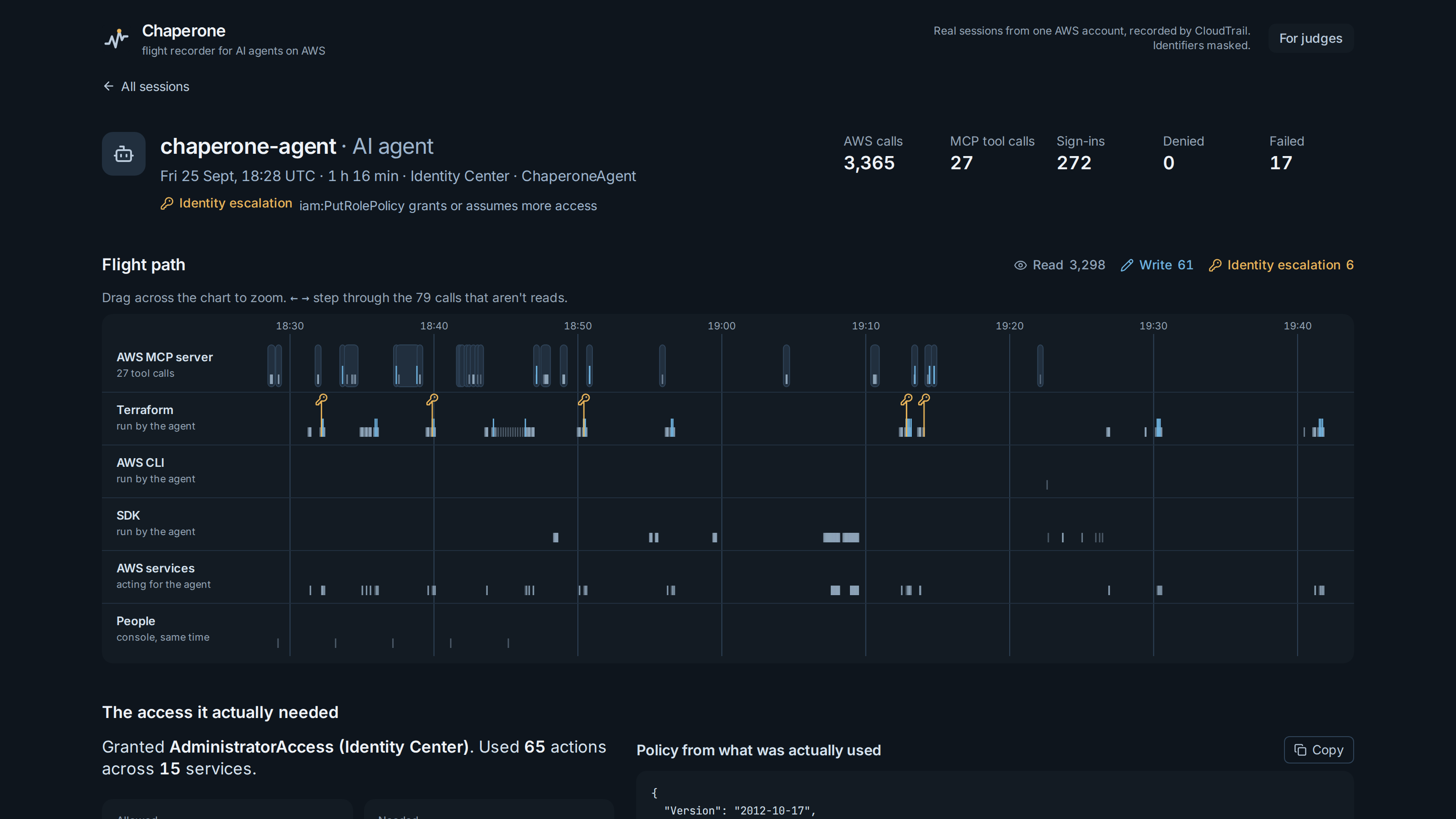
The Day 1 build session in Figure 1 is the clearest example. In 1 hour 16 minutes, the agent made 3,365 AWS calls and 27 MCP tool calls. Six calls were iam:PutRolePolicy from Terraform: three on roles that session had just created, three on roles that already existed. Those last three are the ones a reviewer should open. Chaperone marks risky calls on resources created in the same session (on_resource_created_this_session), because cleanup isn't damage and a policy on a brand-new role isn't the same as one on a role someone else depends on. It's context for the reviewer, not a lower risk class.
Least privilege, measured against AWS's own tool
The agent was allowed "Action": "*". That session used 65 actions. I wanted to know how Chaperone's measurement compared with the policy IAM Access Analyzer generates from CloudTrail, so I ran both on the same window.
Access Analyzer took 3 minutes 27 seconds; Chaperone's preview is instant from the same recorded events. The first diff had 14 differences. Tracing each one to its CloudTrail events found four Chaperone bugs:
- Not found still means allowed. Terraform probes optional bucket settings and gets
NoSuchCORSConfigurationon every plan. Dropping failed calls loses permissions Terraform needs. Now only access-denied calls are dropped. - Event names aren't IAM actions.
ListBucketsiss3:ListAllMyBuckets;GetBucketReplicationiss3:GetReplicationConfiguration. - AWS services act under your identity. Lambda encrypting environment variables logs
kms:Decryptas the agent, withinvokedBy: lambda.amazonaws.com. The agent never called KMS, so those don't belong in its policy.
After the fixes, 72 of 75 actions matched. The rest is where each tool sees something the other can't:
- Access Analyzer missed
logs:FilterLogEvents: 18 successful calls inside the window. A policy built only from its output would break the agent's log tailing. - Both missed
iam:PassRole. CloudTrail doesn't record it as an event, but bothCreateFunctioncalls needed it. The role ARN is in the request, so Chaperone reads it from there and scopes PassRole to exactly those roles. Access Analyzer can't: it reads permissions, not requests.
So Chaperone shows both, side by side, and says what each one missed.
Can the agent review its own work?
Yes, and that's the part I'm proudest of. Chaperone ships an MCP server with five tools: list_sessions, what_did_the_agent_do, risky_calls, review_session and least_privilege. Pass "me" as the session and it resolves, from the IAM identity that signed the request, to the caller's own latest session. Before an agent says "done", it can ask what it actually did, from a record AWS wrote and the agent can't edit.
In the clip below, the agent creates and deletes a queue through the AWS MCP Server, then asks Chaperone about its own session:
The answer it reads back, trimmed:
{
  "tool": "aws___run_script",
  "apis": ["sqs:CreateQueue", "sqs:DeleteQueue"],
  "risk": "destructive",
  "risky": [
    {
      "action": "sqs:DeleteQueue",
      "target": ".../111122223333/chaperone-demo-queue",
      "via": "mcp",
      "on_resource_created_this_session": true
    }
  ]
}
One destructive call, on a resource the same session created. That's a clean bill of health, and the agent can say so with evidence.
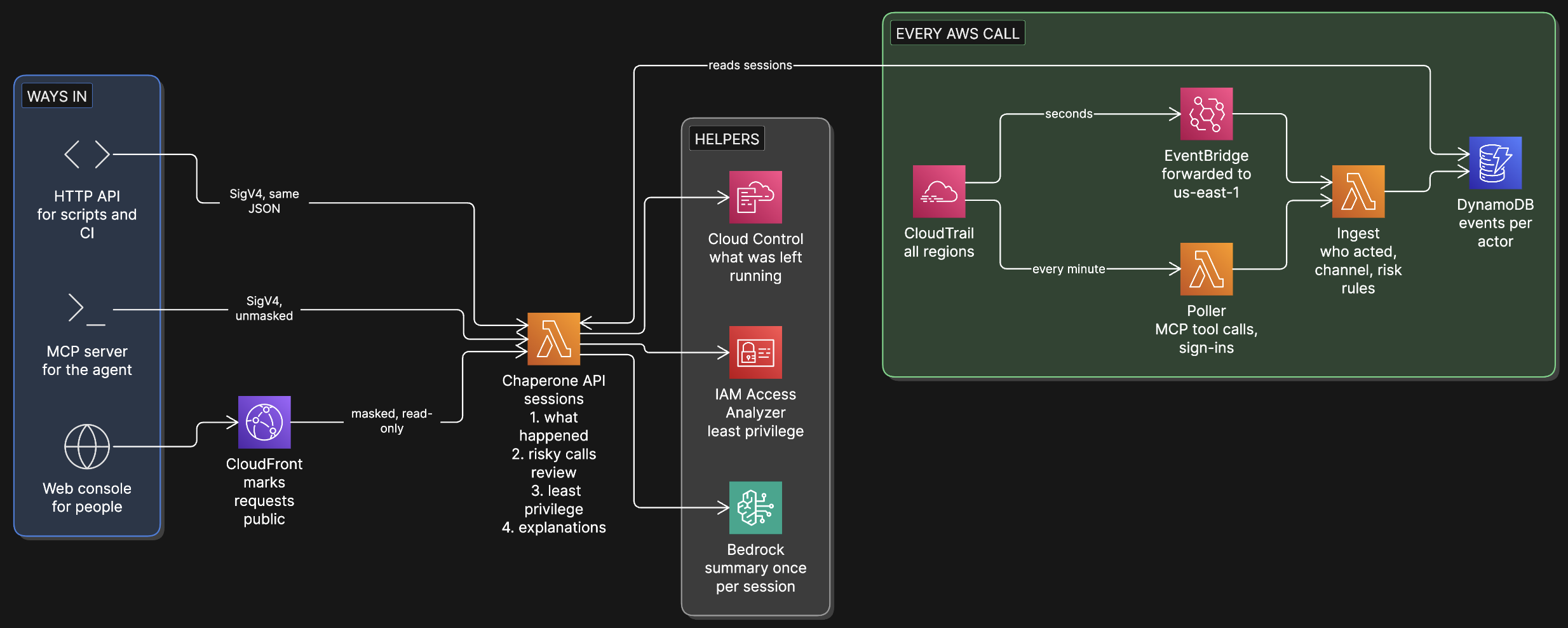
The MCP server is one of three ways in. The same API serves a web console for people and signed HTTP calls for scripts and CI, so an agent, a reviewer and a pipeline always see the same answer.
How do you put real account data on a public website?
Mask the finished response, not the fields you remember. The public console shows real sessions from my AWS account, so the API needed a public mode that can't leak.
- CloudFront marks every website request with an origin header (
x-chaperone-view: public) that visitors can't override. A request that sends its ownx-chaperone-view: privatestill gets masked data, because CloudFront's header wins. - Masking runs on the final JSON text, after everything else. It catches the account ID (plain and base64), the Identity Center role suffix, directory and identity store IDs, IPs, access keys, tokens, emails, and CloudFront and function URL IDs. A new field added next month can't slip past it.
- The public view can't start work.
id=me, Access Analyzer jobs and Bedrock generation all return 403. Visitors never cause a model call. - It serves a slim replay. The longest session's full timeline was 4.1 MB; the public replay is 873 KB, and about 102 KB on the wire with brotli.
On launch day I leak-scanned 46 live responses (1.6 MB) for every identifier shape. Nothing came back. That's why the account on the site reads 111122223333.
What surprised me along the way?
I kept a list of 41 gotchas. These are the ones most likely to save you an afternoon:
- The Bedrock catalog lists models your account can't call. Newer Anthropic and OpenAI models appeared in
ListFoundationModelsand then failed with "not available for this account". Service Quotas showed why: their tokens-per-minute quota was 0 on this account. Check quotas before designing around a model. I used Claude Sonnet 4.6, after submitting Anthropic's use-case form. - A tiny probe can pass where the real call fails. A 5-token "hi" to Sonnet 4.6 answered; the real call with a system prompt was refused until the use-case form was on file. Probe with the real request shape.
- EventBridge can silently skip CloudTrail events. Twelve
kms:Decryptcalls made for the agent never reached the rule. Don't treat EventBridge as complete: Chaperone reconciles withLookupEventsevery few minutes. A fully paginated check across 17 regions then read agent 651/651. - Widening an EventBridge pattern can build a feedback loop. Forwarding AWS-service events includes EventBridge assuming its own forwarder role. Exclude your own roles in the pattern and test it with
TestEventPatternfirst. agentis a DynamoDB reserved word.SET agent = :afails. It only showed up on the first agent event, because sign-in events skip that clause.- CloudFront to a Lambda function URL needs two permissions:
lambda:InvokeFunctionUrlandlambda:InvokeFunction, both scoped to the distribution. Older examples show only the first. - Cloud Control's IAM prefix is
cloudformation:, notcloudcontrol:. A policy withcloudcontrol:GetResourceapplies without complaint and denies every call. Access Analyzer'sValidatePolicycatches it. - The MCP Python SDK 2.x renamed
FastMCPtoMCPServer(mcp.server.mcpserver). And onlyToolErrormessages reach the model; any other exception shows up as "Error executing tool", so the agent can't tell an expired SSO session from a 404. - A single-page app is invisible without JavaScript.
curlof the live site returned an empty<div id="root">. I prerendered the overview and the tour so crawlers and AI assistants can read them.
What does Chaperone deliberately not do?
- It never blocks, deletes or reverts anything. A recorder that acts would be one more agent to watch.
- A model never decides risk. Fixed rules do, tested on real recorded events. Bedrock writes only the plain-English summary, once per session.
- It shows what was called, not the code. AWS doesn't record the scripts an agent sends through MCP.
- It's review, not prevention. API calls arrive within seconds; MCP tool calls within a few minutes.
If you want prevention, AWS gives you the pieces: the AWS MCP Server's IAM condition keys, permission boundaries, SCPs. Chaperone's least-privilege output is meant to feed exactly those.
By the numbers
Numbers are as of Sep 27, 2026, from the live system and Cost Explorer. The month's bill stayed under a dollar because everything is serverless and on-demand: Lambda on arm64, DynamoDB on-demand with a throughput cap, CloudFront in front, and Bedrock called once per session, never per visitor.
How can you try it?
- Open the 3-minute tour.
- Open the session marked Start here: read the explanation, then the flight path, then click a key icon to see the call, the rule that flagged it and the MCP tool call above it.
- Check the masking:
/api/replay?id=mereturns 403 on the public site. - Run it in your own account: the repository's README has the steps. You need a CloudTrail trail, Terraform, and an agent with its own identity.
The next step is a read-only pilot on one non-production account: the agent-activity review, and a least-privilege policy per agent role built from every session that role ran, not just one. If your team is letting coding agents work in AWS and you'd like to try it, I'd like to hear from you.
Further Reading
- AWS Just Made Its Platform Agent-Native: what the AWS MCP Server's GA means, and why it made a tool like this necessary.
- The importance of LLM observability: the model-side view of the same problem. Chaperone is the cloud-side view.
- MCP breaks with its stateful past: where the protocol the agent uses to reach AWS is heading.
- IAM Access Analyzer policy generation, in the AWS docs: how AWS builds a policy from CloudTrail.
Built for the AWS Zero to Shipped hackathon, with Claude Code and the AWS MCP Server.