The One-Liner That Wasn't
pip install chatterbox-tts. That's the whole quickstart. Resemble AI's own docs make zero-shot voice cloning look like a solved problem you drop into a project over lunch.
It isn't — not if you want it running with real GPU acceleration, on your own hardware, with your own cloned voice. Getting Chatterbox working on an M3 Max meant one architectural fork that made "just reuse what I built for the last model" impossible, and one dependency cascade that took two separate fixes because the first fix reintroduced the exact conflict it was supposed to solve.
Neither problem is in the docs. Both are the actual work.
Why Chatterbox, Over Three Other Things I Tried
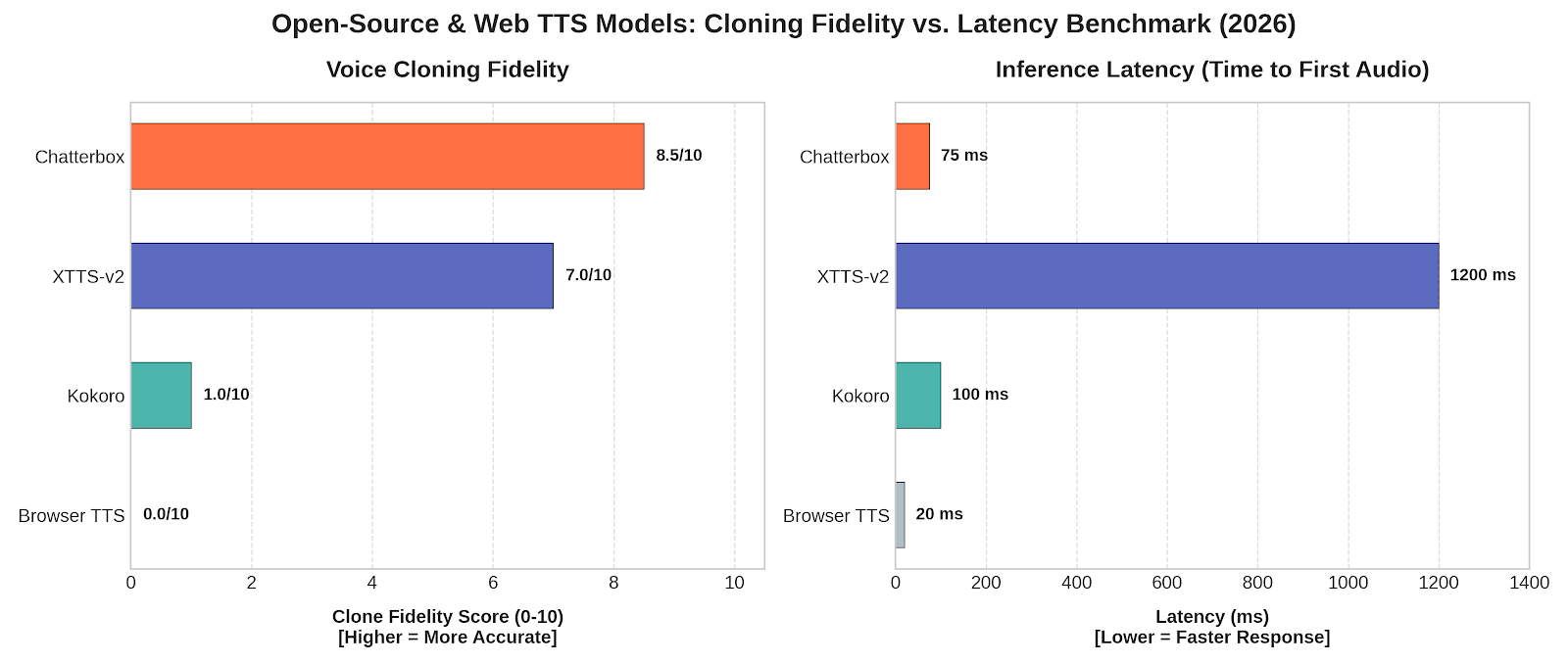
Before Chatterbox, I ran the same voice-cloning task through Browser TTS, Kokoro AI, and a VoiceBox/XTTS-v2-style setup. Browser TTS was instant and free and sounded like it — no cloning, just a system voice. Kokoro was fast and genuinely good for a browser-native model, but it doesn't do native voice cloning; you're bolting on a separate clone step. The XTTS-v2 route got closest to a convincing clone but was laggy, and its license (Coqui's CPML) restricts commercial use — a real problem if this ever ships in a product, not just a blog demo.
| Model | License | Params | Cloning | Verdict |
|---|---|---|---|---|
| Browser TTS | N/A | N/A | None | Instant, obviously synthetic |
| Kokoro-82M | Apache 2.0 | 82M | Bolt-on only | Fastest, not a native clone |
| XTTS-v2 (VoiceBox-style) | CPML (restricted) | ~450M | Zero-shot, 6s ref | Convincing but laggy, unmaintained since 2024, license friction |
| Chatterbox Turbo | MIT | 350M | Zero-shot, ~5–10s ref | Won — license + latency + quality all cleared the bar together |
Chatterbox is the first one in that list where all three constraints — license, latency, and "does it actually sound like me" — cleared the bar at the same time. Resemble's own blind evals report a 63.75% preference rate over ElevenLabs, and on my own reference clip, the difference from XTTS-v2 wasn't subtle. It's also MIT-licensed end to end, which means self-hosting it isn't a legal gray area the way running XTTS-v2 in a commercial context is.
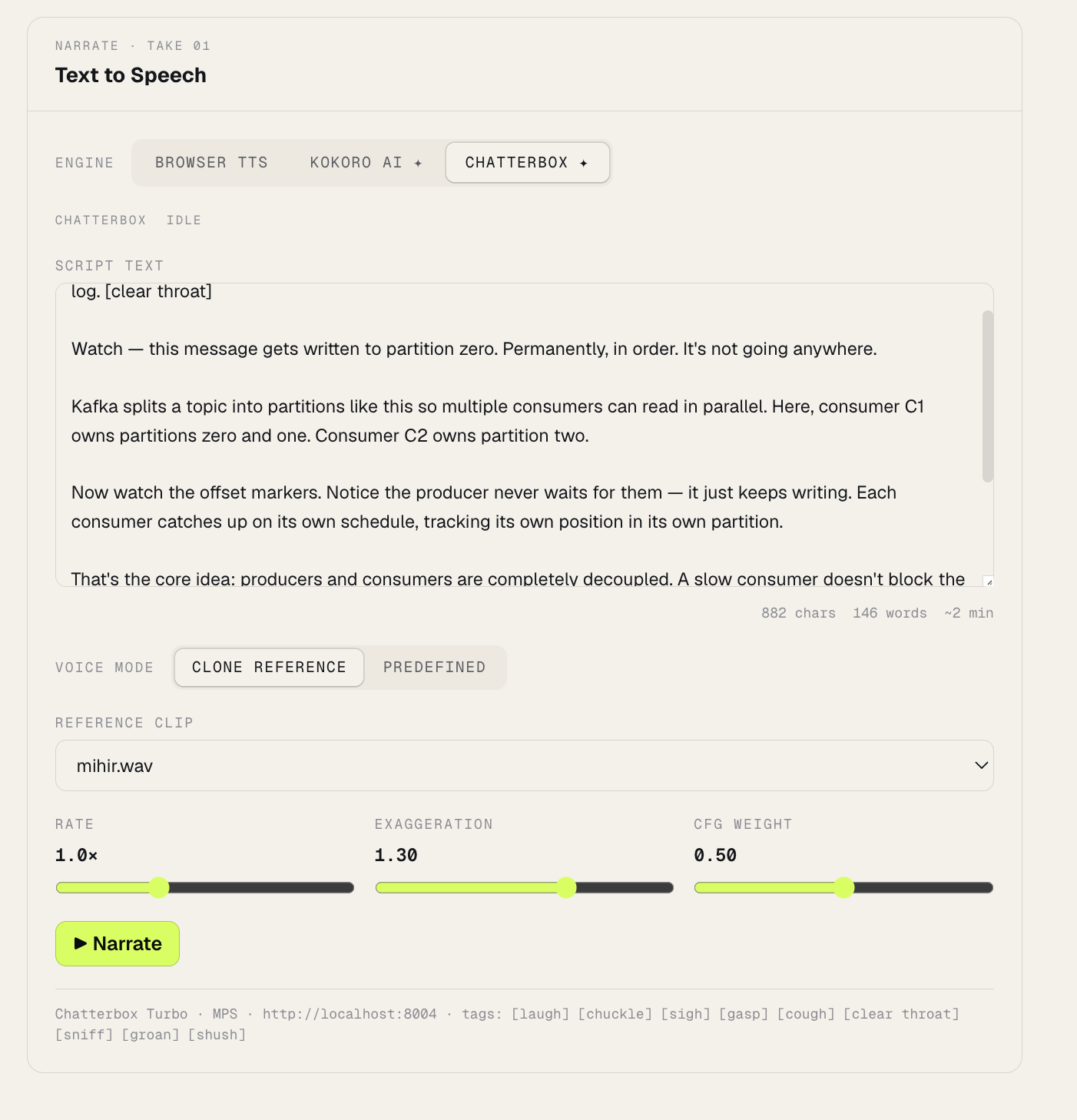
The two knobs that actually matter here — exaggeration (emotional intensity) and cfg_weight (pacing/adherence to the reference) — are what separate Chatterbox from "just another cloning model." Nothing else in that table gives you that control.
The Fork Kokoro Couldn't Prepare Me For
I'd just finished wiring Kokoro into a Web Worker — fully client-side, WebAssembly/ONNX, zero backend. The plan was to do "the same thing" for Chatterbox.
That plan died in about five minutes. Kokoro is 82M params with a browser-compatible ONNX export. Chatterbox is 350–500M params, PyTorch-native, with no browser export path at all. It needs a real, running Python process. Every decision after this point is downstream of that one fact.
The obvious move was adding Chatterbox as a fifth service in the project's existing docker-compose stack. That doesn't work on macOS: Docker Desktop can't pass the host's Metal/MPS GPU through to containers. An 82M model tolerates CPU-only. A 350M model with a diffusion decoder does not — I judged it likely to be painfully slow, and I didn't want to find out the hard way mid-demo.
So Chatterbox runs as a native macOS process, outside Docker, talking to the frontend over a plain fetch() — the browser calls localhost:8004 directly, since it's the browser (not the containerized frontend) making the request. The cost is explicit: one more process to remember to start. The payoff is real MPS acceleration, confirmed directly:
import torch
print(torch.backends.mps.is_available(), torch.backends.mps.is_built())
# True True
The Cascade That Looked Fixed Twice
The install hit a wall almost immediately:
pip install --no-deps git+https://github.com/devnen/chatterbox-v2.git@master \
  s3tokenizer==0.3.0 onnx==1.16.0
Command '['...cmake', '-DPYTHON_INCLUDE_DIR=...', ...]' returned non-zero exit status 1.
ERROR: Failed building wheel for onnx
onnx==1.16.0 — the version pinned in the server's requirements.txt — has no prebuilt wheel for the Python I was running. Pip fell back to a from-source cmake build, which failed, and because pip resolves all wheels in one pass before installing any of them, this silently blocked chatterbox-tts and s3tokenizer too, even though those two had already built fine.
Checked PyPI's release history directly for the first onnx build with a real (non-rc) wheel available, bumped to onnx==1.18.0, retried. All three packages installed cleanly. Problem solved — or so it looked for about ninety seconds, until the import chain failed differently:
File ".../onnx/onnx_ml_pb2.py", line 9, in <module>
    from google.protobuf.internal import builder as _builder
ImportError: cannot import name 'builder' from 'google.protobuf.internal'
onnx==1.18.0 requires protobuf>=4.25.1 — the builder module doesn't exist before protobuf 3.20. But descript-audiotools, pulled in earlier as a transitive dependency, has its own metadata pinning protobuf<3.20,>=3.9.2, and it had already won the resolution, installing protobuf==3.19.6. This is the exact conflict the original onnx==1.16.0 pin existed to avoid. Bumping onnx for one reason reintroduced the same conflict from the opposite direction.
pip install "protobuf>=4.25.1"
# installs protobuf-7.35.1, warns about the descript-audiotools conflict, proceeds anyway
It worked — descript-audiotools's protobuf usage turned out to be an unused TensorBoard logging path. But "it worked" isn't the takeaway. The takeaway is that a pin in someone else's requirements.txt is rarely arbitrary — it's usually load-bearing for a reason specific to their environment. Un-pinning one thing doesn't remove the constraint; it just moves the collision to a different pair of packages. The fix isn't "always respect pins" or "always override them." It's reading each one closely enough to know whether the reason it exists still applies to you.
From Terminal to My Own Voice, in the Browser
Once the server was up — MPS requested and functional, model loaded at 24kHz — the smoke test with a predefined voice returned a valid WAV in about a second. Cloning was the real test.
Reference clip: a 24.7-second .m4a recording of my own voice, converted with ffmpeg to a mono 24kHz WAV (the server's audio libraries can't decode AAC without it):
ffmpeg -i mihir.m4a -ar 24000 -ac 1 -y reference_audio/mihir.wav
curl -X POST http://localhost:8004/tts -H "Content-Type: application/json" \
  -d '{"text":"Hey, this is a test of voice cloning [chuckle] using my own reference clip.","voice_mode":"clone","reference_audio_filename":"mihir.wav","output_format":"wav"}' \
  --output clone_test.wav
Worked on the first real attempt. 7.64 seconds of audio, and it was unmistakably my own voice, pacing and all.
That [chuckle] tag isn't decoration — Turbo supports nine paralinguistic tags ([laugh], [chuckle], [sigh], [gasp], [cough], [clear throat], [sniff], [groan], [shush]), lowercase, exact syntax, and they double as natural pause insertion — cheaper than post-processing silence gaps by hand. Get the tag placement and the exaggeration/cfg_weight balance right, and the difference between "clearly synthetic" and "clearly me" gets uncomfortably small.
The frontend panel below is where those two knobs live — Exaggeration and CFG Weight, sitting next to the shared Rate slider and a live-populated reference-clip dropdown, defaulting to mihir.wav:
This Isn't a TTS Demo
Every generated clip carries Resemble's Perth watermarker — imperceptible, survives compression and editing, designed to be nearly undefeatable at detection. Resemble's own stated position is blunt: don't use this to do bad things. That watermark being non-optional, baked into the output rather than left to policy, is a tell. The people who built this know exactly what it's for once it leaves a research repo.
Once you've actually cloned your own voice locally — not watched a demo, done it — the applications stop feeling hypothetical. A content creator recording five videos a week doesn't need five separate takes with five slightly different vocal deliveries; the reference clip is the consistency. Film and studios sitting on decades of a legendary performer's voice have an IP asset they've mostly left dormant — a licensed, watermarked, consent-gated version of that voice is a very different proposition than a deepfake scraped off YouTube. Call centers and sales orgs have spent a decade fighting the "obviously a robot" perception problem with scripted IVR; a natural, expressive, on-brand voice that never has an off day changes what that conversation sounds like. I've heard secondhand that some sales teams running voice-clone-driven outreach are closing faster than their human reps — I can't verify that number, but I believe the mechanism: consistency and tone control at a scale no single human rep sustains across a hundred calls a day.
And the endpoint I keep coming back to isn't a call center at all. It's a humanoid robot, or something as mundane as a household assistant, speaking in a warm, specific, unmistakably human voice instead of the flat synthetic tone we've all learned to tune out. That's the version of this technology that actually changes how people feel about talking to a machine — not the demo, the daily interaction.
I don't have a clean answer for where the line sits between "useful" and "unsettling" on that spectrum. I'm not sure anyone does yet. But I now have a server running on my own machine that can say anything, in my own voice, in under a second — and that's not a sentence I expected to be able to write casually.